Advertise | About | Tech Consultations | Write for Us | Contact

Creating 3D Text Animation in Flash CS4

By Rafiq Elmansy (admin)   |   May 16, 2009   |   Posted in Flash   |   2 Comments  
Share


Creating 3D Text Animation in Flash CS4

This tutorial presentation is a first try through Slide Share to create tutorials in the form of power point, However, please let us know if this new method to present small tutorials is better and why in your openion.

Below is the presentation of the article and you can download the presentation here.

In this small presentation, we will see how to create a 3D animation text in Flash CS4 using the 3D new tool in Flash. Also, we will see how to animate it using the new motion tweening feature.
Also, you can see this tutorial on www.graphicmania.net.
Creating 3D Text Animation in Flash CS4

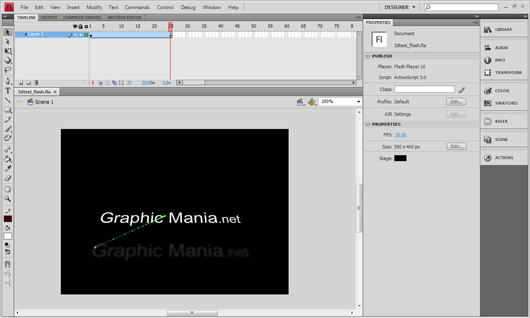
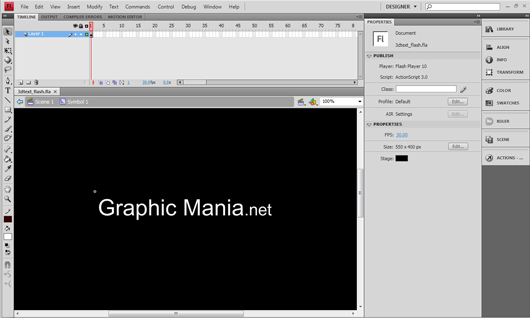
1- Start by create a new text using the text tool and convert the text into movie clip symbol by pressing F8 and choose Movie Clip from the list.
Creating 3D Text Animation in Flash CS4

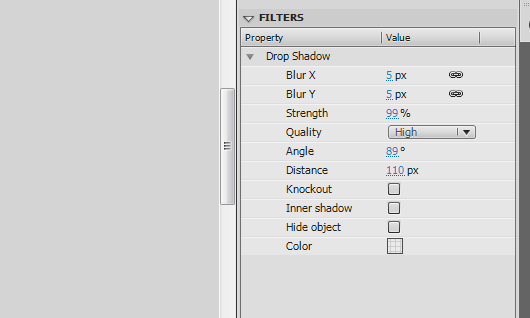
2- Add a drop shadow filter to the text using the values in the image. Notice that the shadow will be affected to the 3D position and rotation of the text.
Creating 3D Text Animation in Flash CS4

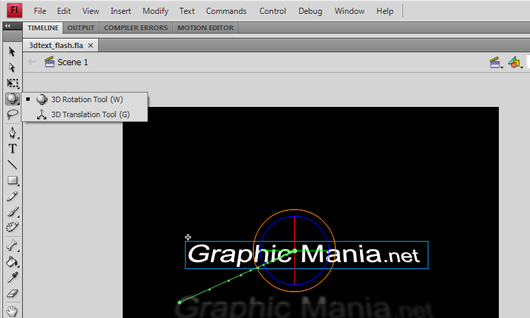
3- Select the movie clip using the 3D Rotation Tool. And drag over the red cycle to rotate the symbol on the X axe.
And use the 3D Transform Tool to change the position of the symbol over the 3D dimensions.
Creating 3D Text Animation in Flash CS4

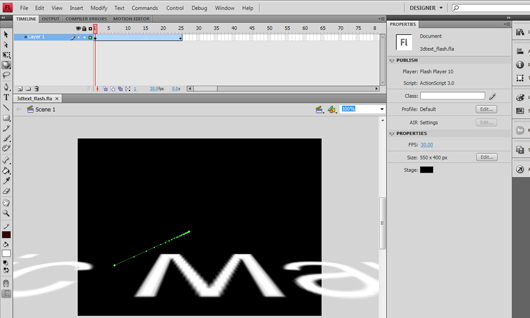
4- To create the animation in the 3D space. Extend the timeline to frame 25 by pressing F5 to add frames.
5- Right-click the timeline and choose Create Motion Tweening
Creating 3D Text Animation in Flash CS4

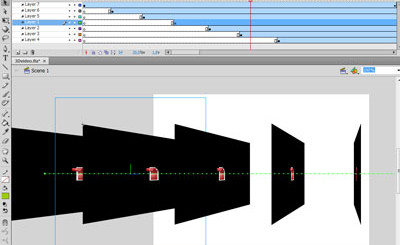
6- In frame 25, change the position and rotation of the symbol using the 3D tool.
In this example, the text symbol moves from outside the stage to position into the stage through the X dimention.

At the end of this short tutorials, I hope you enjoy it and find it brief and useful.

Creating 3D Text Animation in Flash CS4
  • Digg
  • del.icio.us
  • Facebook
  • StumbleUpon
  • TwitThis
  • Reddit
  • Mixx

Tags: , ,

Line Break

Author: Rafiq Elmansy (admin) (561 Articles)

My name is Rafiq Elmansy, senior graphic design,founder of Graphic Mania and owner of Bee Design Studio. I am also an Adobe community expert, Adobe user group manager and Adobe certified Flash CS4 and Photoshop CS4 . As a contributor writer, I wrote articles for Adobe Design and Developer center. Also, I am a guest author at communitymx.com.

Random Posts

2 Comments to “Creating 3D Text Animation in Flash CS4”

  • hahah super

  • How to animate text in flash cs4

Post comment

CommentLuv Enabled
 

pixmac

Host Unlimited Domains on 1 Account


Pages

New Arrivals

Resources News

  • 9 Funniest JavaScript EffectsFebruary 8, 2010

    JavaScript can make many funny things that you may not have realized. Here’s list of funniest things JavaScript can do

  • 20 classy free sans-serif fontsFebruary 8, 2010

    Sans-serif fonts have become the de facto standard for body text on-screen, especially online. It’s mainly because the screen resolution limit makes the serifs look blurry or too large.

  • 30 The Best jQuery plugins inspired from Twitter a…February 8, 2010

    The plugins in this article will allow you to insert in to your website very interesting effects of Social media giants: Twitter and Facebook. If you want to create Facebook like Twitter fan page o…

  • Valentine’s Day Themed Pattern Tutorial Usin…February 8, 2010

    Saint Valentine’s Day is coming, soon millions of will be giving and receiving gifts to show how big are their love. This tutorial aims to guide you through the process of creating a unique St. V…

  • 34 Ways to bring Traffic to your Website or BlogFebruary 8, 2010

    If you want to promote your blog/website, so here are some tips for you to make your Website/blog popular and bring traffic to your website/blog. Also it is having some useful links of most popular…


Useful Links


Graphic Mania on Facebook