
Creating 3D Text Animation in Flash CS4
6This tutorial presentation is a first try through Slide Share to create tutorials in the form of Powerpoint, However, please let us know if this new method to present small tutorials is better and why in your opinion.
Below is the presentation of the article and you can download the presentation here.
Creating 3D Text Animation in Flash CS4
In this small presentation, we will see how to create a 3D animation text in Flash CS4 using the 3D new tool in Flash. Also, we will see how to animate it using the new motion tweening feature.
Also, you can see this tutorial on www.graphicmania.net.
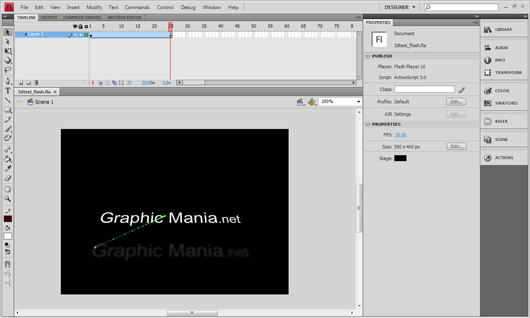
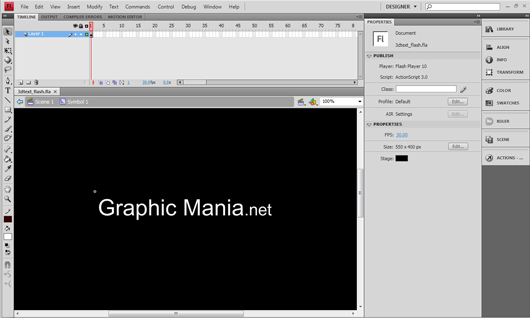
1- Start by create a new text using the text tool and convert the text into movie clip symbol by pressing F8 and choose Movie Clip from the list.
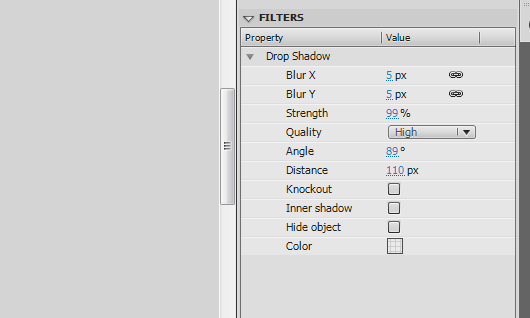
2- Add a drop shadow filter to the text using the values in the image. Notice that the shadow will be affected to the 3D position and rotation of the text.
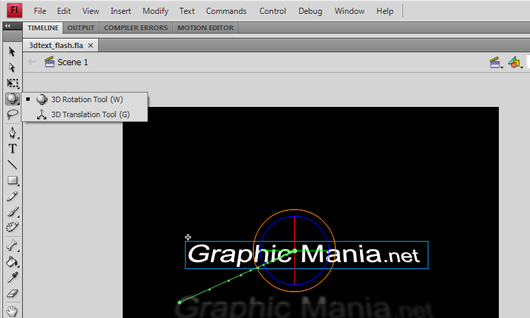
3- Select the movie clip using the 3D Rotation Tool. And drag over the red cycle to rotate the symbol on the X axe.
And use the 3D Transform Tool to change the position of the symbol over the 3D dimensions.
4- To create the animation in the 3D space. Extend the timeline to frame 25 by pressing F5 to add frames.
5- Right-click the timeline and choose Create Motion Tweening
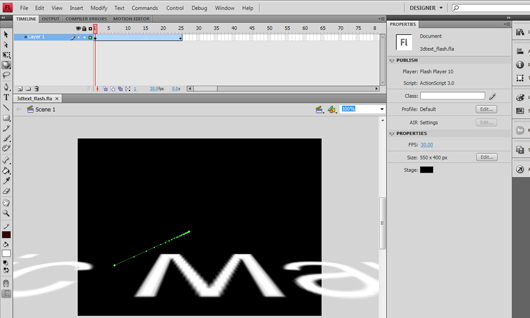
6- In frame 25, change the position and rotation of the symbol using the 3D tool.
In this example, the text symbol moves from outside the stage to position into the stage through the X dimention.
At the end of this short tutorials, I hope you enjoy it and find it brief and useful.




hahah super
How to animate text in flash cs4
this is a good thingy mabob apart from it has made more work for us at school 🙁
who ever made this should have put it on youtube so we can’t use it at school that would have been great.
good work through XD