Advertise About Tech Consultations Write for Us Contact

Creating Glossy Vista style Buttons in Flash

By Rafiq Elmansy (admin)   |   September 18, 2008   |   Posted in Flash   |   View Comments  
→ Photoshop 3D for Animators: The complete guide to learn 3D and animation in Photoshop CS5. Pre-order this book now and receive a %22 discount here

Creating Glossy Vista style Buttons in Flash

Introduction

Flash is an extendable tool, you can use it in creating different types of graphic content and animation. What makes Flash a flexible tool is the deep simplicity in it. However, you can use Flash tools in creating you graphic elements depending on how can you twist the tool to meet your needs.

In this article, we will see how to create Glossy Button that we used to do in Photoshop. But the advantage here is that it will be full vector and editable in Flash.

Requirements:

Adobe Flash CS3 professional

Try
Buy

Sample files.zip

To complete this tutorial, you will need basic knowledge of using Adobe Flash CS3 Professional.

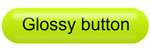
The Glossy effect goes many styles. We will see how to create one of these styles (figure01) and you can use the same way or other ways to create different styles as you see in the Samples file.

Creating Glossy Vista style Buttons in Flash

Figure01. Sample of the glossy or Vista style effect buttons

To create the glossy effect, do the following steps:

1- Open a new document in Flash.

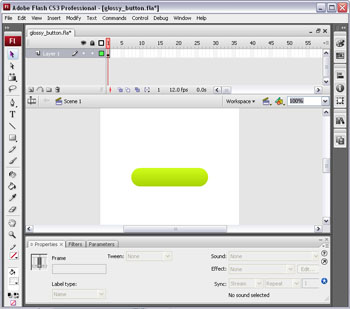
2- Create a rectangle with a rounded corner and gradient color as you can see in figure02.
Creating Glossy Vista style Buttons in Flash


Figure02. Create the rectangle of the button with gradient color.

3- On a new layer, create a white thin rectangle (make it white color with alpha 50% from the color panel) to work as the glossy material reflection. Add it to the top of the big rectangle and convert it into a movie clip symbol.

4- Apply a blur filter to the rectangle to it a blur filter to give a feel of a glossy material.

5- Add another copy of the white rectangle on the bottom of the button and give the movie clip alpha 50% from the color drop-down menu in the properties panel (figure03).
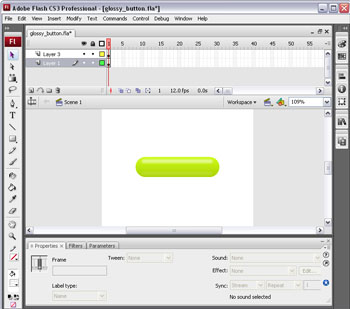
Creating Glossy Vista style Buttons in Flash

Figure03. The glossy results after creating the white reflection rectangle.

6- Add the text you desire to the button and preview it.

Where to go from here

Adobe Flash enables you to create many style and effects, try to explore different effect using the above tutorial or similar styles as you can see in the samples file.


Tags: , , ,


About Rafiq Elmansy (admin)

Rafiq Elmansy is a graphic designer and runs his own design studio Pixel Consultations. He is also an Adobe Community Professional, Certified Expert and Adobe user group manager. He is a Friend of Icograda (the International Council of Graphic Design Associations). You can read his writings on Adobe site, Adobe Edge magazine, communitymx.com and his own blog www.graphicmania.net. He can also be followed on Twitter @rafiqelmansy

Enter your email to receive updates:

Comments are closed.

Subscribe without commenting

Follow on Twitter Subscribe: RSS | Email


Enter your email to receive email alerts of new posts and fresh free resources .

Pages


Resources News

  • Create a Vibrant and Eye-Catching Drink Compositio…August 18, 2010

    In this Photoshop tutorial, you’ll learn how to create a Sobe fruit drink advertisement using some simple water stock images and a lot of easy to use techniques that will yield high quality resul…

  • 25 FREE HIGH QUALITY VECTOR FILESAugust 18, 2010

    We would like to proudly introduce you to Vectorious.net. Vectorious is a great resource for finding royalty free stock vector images. Currently they offer over 12055 vector image files available f…

  • Logo Design: 80+ Beautiful ExamplesAugust 18, 2010

    It has been almost four months since my last post on logo design. Since then I have assembled an amazing collection of fresh new creative logos for you to be inspired by. I am confident that these …

  • Poster Art – Reminiscence Down the History LaneAugust 18, 2010

    Poster art is one of the most well-defined forms of art that has a rich historical background that involves a number of famous artists throughout the world. Ranging from advertising campaigning to …

  • The Complete Beginner’s Guide to User Script…August 18, 2010

    A user script is code written in a programming language that allows you to control a piece of software.


Useful Links


Graphic Mania on Facebook