
How To Create A Flash Login Screen Tutorial
25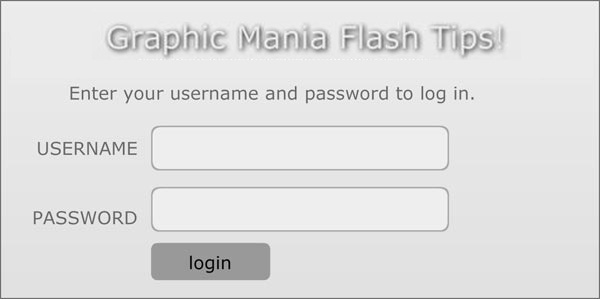
In today’s Flash tutorial I would like to explain to you how you can protect your flash movie with a custom login feature . This is the case that you have sensitive information that only certain people are allowed to see.
Related posts:
- Create Your First Android AIR App in Flash
- How to Create a Snake Game in Flash Using AS3
- Creating Reflection in Flash Using AS3
- Bitmap Data Manipulation in Flash ActionScript 3
- Creating and Controlling Flash Animation with XML
- How to Build a XML Driven Quiz Application in Flash
- Approach to Understand XML and Flash Workflow
To do this we will just be using conditional statements (if/else) in actionscript.
Note of caution, this is not really a secure way of protecting your file, as somebody could decompile your swf, and therefore gain access to your sensitive information(username/password). It is meant to serve as a real world example of using contiional statements in flash & AS 3.
Let’s assume that I have a secret page that I would to protect, and I only want to share this information with a few friends. In this case it is a page of “Secret Flash Tips”
First create a new flash AS 3 document

make the width 600 px and the height 300px with a black background.
lets first create all our layers, I will place everything on its own layer:
- actions
- message
- button
- text
- text input
- header
- background
You should have these layers
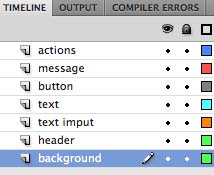
Using the rectangle tool create a recentangle covering the stage I am using no stroke, and a color of#968E95
After you have a background that you like, covert to movie clip(right click, convert to movie clip) call it background. Place this background movieclip onto the center of the stage leaving a boarder, now you could also leave the stage color white and use a heavy stoke, but I am just doing it this way. You should do this in the background layer.
Next take the text tool and create and create a header for this login page, I am using Verdana 30 px white with a knockout drop showdow. The text simple says” Graphic Mania Flash Tips”. Again in the header layer.
Below the header take the rounded rectangle tool and create 2 text input areas. I am using height 200, height 30, with a color of #EEEEEE, and triangle options of 7.8. Then place both text boxes and on top of each other, and place a dynamic text field on top of each of them. I am using American Typewriter Font(included in the fla), and don’t forget to embed your fonts! For both of the dynamic text fields give them an instance name of userTxt (for username), and passTxt(for password). Also for the password field to get the “******” in the password text field, make sure to set the behavior to “password”. This is in the text input layer
To the right or each text input in the text layer, place the text USERNAME(top text input), and PASSWORD for the lower text input. This is done in the text layer.
Above the text input we will place a dynamic text field (message layer), with an instance name of messageTxt. I put the text “Enter your username and password to log in”
final we will make a button, take the rounded rectangle tool create a square(80X 25) place the text login in the center, convert to movieclip call it login_btn
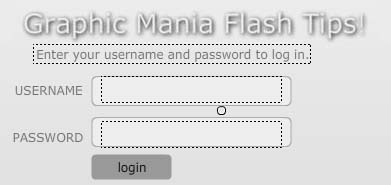
now the first scene design is done, and you should have this:
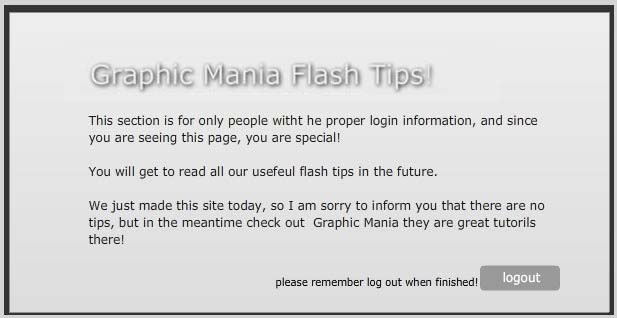
Now for the next scene, create keyframes for the second frame of the movie. We will only have the header, below the header will be a text field with a message, and below this another text box(telling people to remember to logout when they are done) to the right of the text box is another movieclip of a button, but this one has the text logout instead of login, and has an instance name of logout_btn. I also made the text white just to be a little differrent.
You should have something like this when you are done:
Now the design is done, and in the first keyframe, right click, and open up actions panel. The code to get this working is actually very simple.
First we use the stop command, so the movie does not loop by default, then some button handling(which I have talked about in past tutorials)
The logic is if they enter the correct password, let them to the second page, otherwise, show an error message. See complete code for frame 1:
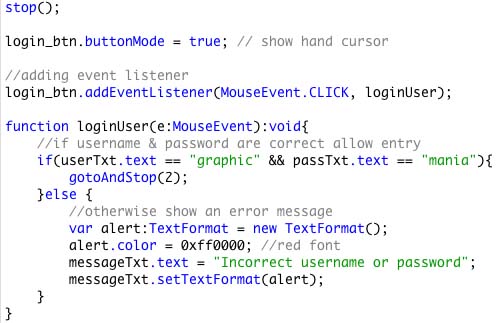
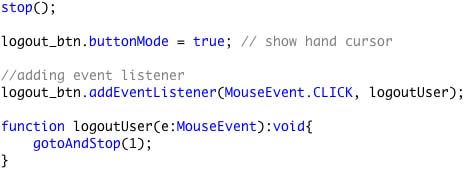
So after they are done in the secure area, we want a way for them to be able to log out, which is done by sending them back to the login page. The logic here is when the button is clicked, send them back to the login page(frame 1).
You can check the final SWF result below:
SWF result
Now that is it for now, next time I will show you the same application, but instead of coding to another frame, it will go to a webpage.

Until next time happy flashing!
Johnny-



Thank’s for the tut,
But can I ask you to add another part so we can verify the login/pass stored in the data base using php or coldfusion or even both of them
and also a sign up section to let the user register…
Thanks John.
Social comments and analytics for this post…
This post was mentioned on Twitter by grafikservice: How To Create A Flash Login Screen Tutorial http://bit.ly/dwA1Rh…
[…] How To Create A Flash Login Screen Tutorial […]
Hi Hicham,
great idea for a future tutorial. I could do this in ColdFusion, which requires flash remoting. Lucky I am well versed in flash remoting
-the flash side does not change much(more actionscript code), and you would do the processing with ColdFusion. I don’t use php, so I would not be the one to write a tutorial one that.
I think first I would need to introduce flash remoting, which is a great idea for a tutorial.
Another tutorial idea could be to do this with XML instead of a database, not as fast or secure, but might make a good tutorial.
[…] How To Create A Flash Login Screen Tutorial | Flash, Design, Vector, Photoshop, Adobe Tutorials | Gr… Cómo crear una página de login con Flash. (tags: informacion tutoriales flash) […]
[…] This post was mentioned on Twitter by HowDo.us, apex, Hawaii Flash , Zizi Vzin, munkkron77 and others. munkkron77 said: ??? flash ?????? login http://www.graphicmania.net/how-to-create-a-flash-login-screen-tutorial/ […]
Hello Johnnyb,
in first, thank you for the tuto.
i am a french young webdesigner, and AS3 is not really simple for me. In your tutorial i want to replace the “goto (2)” by an url (http://xxxxxxxxx.com for example).
Can you help me PLEASE !!!!
Thank you for your answer…
Miklweb
That example will be up in a few days, it is the second part to this one. The main difference is instead of going to a frame it will go to a webpage.
Therefore after somebody enters the site with the correct usernmae/password instead of going to frame 2 it will go to some webpage. This is what you are wanting?
By the way, you say “AS 3 is not really simple for me” Can I ask why? Did you find AS 2 simple, but AS 3 is complex? Or do you find actionscript in general not simple?
.-= johnnyb´s last blog ..ColdFusion & XML =-.
This article has been shared on favSHARE.net. Go and vote it!
.-= favSHARE´s last blog ..Make Money Online With Domain Purchase =-.
[…] Read the original article […]
Hello Johnny,
“Therefore after somebody enters the site with the correct usernmae/password instead of going to frame 2 it will go to some webpage. This is what you are wanting?”
Yes, it’s exactly that i want.
To answer at your question , i find Action script is not simple in general but the AS3 is less easy that As2.
see you !!
[…] The last tutorial I showed how to to create a simple flash based login just using actionscript. A visitor has asked “how do I modify this to go to a web page instead of a different scene?” So this is the topic of today’ s tutorial, and the solution is very simple! […]
thank you so much for the source code. i was about to create how to make an AS3 actionscript to handle login system using Flash CS4
Thx
.-= Glenn´s last blog ..Travian Browser Game =-.
@ miklweb
As promised I created the other tutorial to go to another webpage instead of a scene. I hope you like it, if you have any questions, please let me know.
http://www.graphicmania.net/how-to-create-login-in-flash-tutorial/
.-= johnnyb´s last blog ..Remoting Login & ColdFusion =-.
@Glenn Cool I am glad
-One not I would not use this in production as it is not secure(nor is it meant to be), In production you should really use a database or XML to store the passwords, but this is fine for non sensitive information too-.-= johnnyb´s last blog ..Remoting Login & ColdFusion =-.
[…] How To Create A Flash Login Screen Tutorial […]
Beautiful! Great site!,Jul 7, 2010 11:29:14 AM
i have macromedia flash 8, which is an earlyer versian, does this work in earlyer versians?
I do not think it will work as you need AS2
This script helped me to create a login page . Thank you
thank u so much for this awsome articl!!! can u please help? i want to add more that one user.! please help me please!
Great tutorial, but im relatively new to AS3. so What would the code be to change it to hitting enter instead of a button? Is it much different?
#Shane
passTxt.addEventListener(KeyboardEvent.KEY_DOWN,handler);
function handler(event:KeyboardEvent)
{
if(userTxt.text == “agent47” && passTxt.text == “alpha” && event.charCode == 13)
{
gotoAndStop(2);
}
}
That’s how I got it working, but if I also add the alert variable at the buttom “else” , then it will just say access denied for every key I press. I wish knew hot to do it so the alert 1st pops up if the entrance is wrong AFTER I have pressed the enter.. :S Hope somebody can understand and can help
Hello John
When tested the flash it gave an error
The class or interface ‘MouseEvent’ could not be loaded
How can i link a login page to my access or excell database?
To see my database after log in.