
Checkbox and AS3 in Flash CS4
6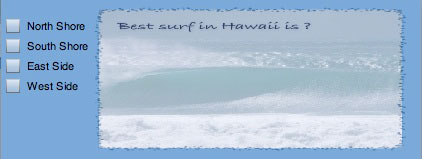
This is part of series on using components in Flash CS 4 with AS 3!
In this tutorial I will show you how to create a checkbox application in Flash CS 4 & use Action Script 3 to add the interactivity. I will be using a small area as this might be something that you would like to become part of a webpage, such as a survey.
Related posts:
- Create Your First Android AIR App in Flash
- How to Create a Snake Game in Flash Using AS3
- Creating Reflection in Flash Using AS3
- Bitmap Data Manipulation in Flash ActionScript 3
- Creating and Controlling Flash Animation with XML
- How to Build a XML Driven Quiz Application in Flash
- Approach to Understand XML and Flash Workflow
Open a new Flash AS 3 Document with size 420px by 160px
Change the background by clicking on stage, and using the color #6699CC
Create 2 layers
interface – this layer will hold all the visual designs
actions – this layer as you guessed will hold all the actions

Now will will create the user interface
Container
First take the rectangle tool and draw a box tot he right of the stage leaving a broader.
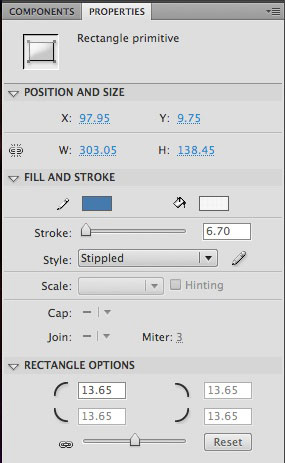
Give the rectangle rounded conners with dimensions of 13.65 for all conners. I also picked the Style to be “Stippled” with a stroke of 6.70 and a color of #336699. below is the properties that I used. This will act as our container.
Dynamic Text
Take the Text Tool and draw a rectangle to cover the inside of the container.
Set the Text property in the Properties to “Dynamic text” with a instance name of response_txt.
I am using the Font “Bradley HandITC TT” and set the color to #000030, with a size of 20.
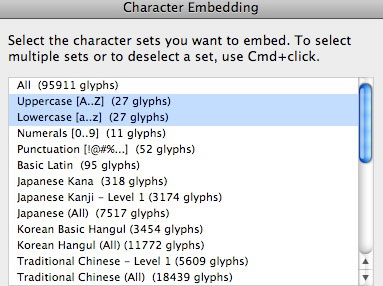
Don’t forget to use Character Embedding
Import image
Now we will import our image to the library.
File >Import to Library find out beach image import it to the library
Now drag the beach image to the stage and match the dimensions of the container.
Convert the Images to a movie clip by right click –> convert to movie clip give it a name of beach.
In the Color Effect in the property inspector change the style to “Alpha” with a value of 44%. This was the reason to convert the image to a movie clip.
Drag the CheckBox components to the library. We will use Action Script this time for the CheckBox!
Lock the interface layer,as we are done.
In the first frame of the actions layer right click go to actions and we start coding!
ActionScript
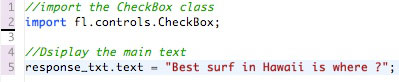
First we import that necessary CheckBox Class, and set up the main text, and display it to the dynamic text field we set up with reponse_txt
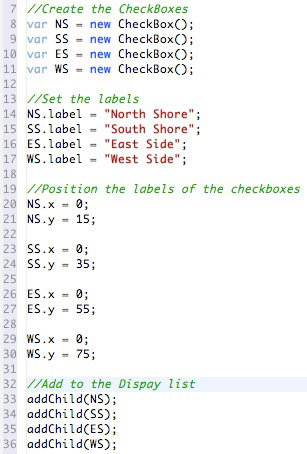
Now we will set up the checkbox:
First we create a variable for each checkbox and set this to a new CheckBox();
then we set the label of the checkbox(the text displayed for the checkbox)
Then we position the labels of each checkbox to place the text to the right and center of each checkbox.
Finally we need to add the checkboxes tot he display list.
Note – the ordering of the checkbox results depends on where they are in the display list!
Now we need to add the Event Listeners for each of the checkboxes, which is a MouseEvent, and we call a function “displayCheckBox”

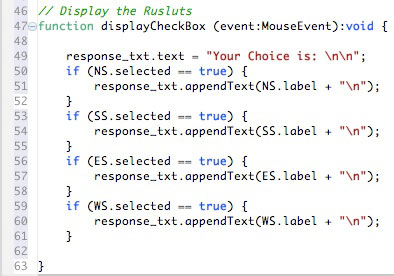
Now we set up the function displayCheckbox
this function of of type MouseEvent, and we set to void as it does not return anything.
Then we change the response_txt to “Your Choice is” and “\n” skips a line for nice formatting.
the stucture of the if statement is:
if the checkbox is checked (== true) then add the label to the checkbox to the dynamic text field by using the checkbox variable name.
That is it, we are done-
See this in action

Download Source
the source has the fla and the image used
Any Question, please e-mail me
Until next time, happyy flashing-
Johnny




Hi, I have followed your tutorial but when i test my movie I keep ending up with this message and the text along side the checkboxes doesnt show up… any ideas??
ReferenceError: Error #1069: Property Label not found on fl.controls.CheckBox and there is no default value.
at Form_fla::MainTimeline/displayResults()
apart from that awesome tutorial
Why do I keep getting this error message when I test my movie??
ReferenceError: Error #1069: Property Label not found on fl.controls.CheckBox and there is no default value.
at Form_fla::MainTimeline/displayResults()
Great tutorial
how can we use this in interactive map to hide and display images at particular point