
Random Numbers With AS 3 in Flash CS 4
7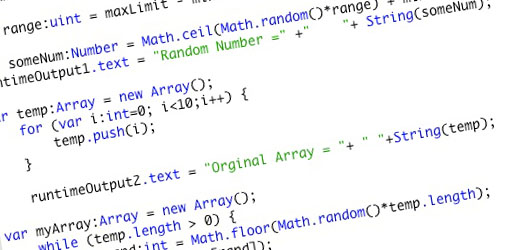
In this tutorial we will explore random numbers in flash CS 4, along with using the Text Area component, creating a play back button, debugging using the trace window, and using arrays.
Related posts:
- Create Your First Android AIR App in Flash
- How to Create a Snake Game in Flash Using AS3
- Creating Reflection in Flash Using AS3
- Bitmap Data Manipulation in Flash ActionScript 3
- Creating and Controlling Flash Animation with XML
- How to Build a XML Driven Quiz Application in Flash
- Approach to Understand XML and Flash Workflow
Create a new flash AS 3 document with the dimension of 375 X 220 (The size is up to you). Create a background color of #CCCCCC (A grey background).
The first frame of the movie will be a place-holder, in the first keyframe rightclick, to the actions panel, and add this code

This makes the movie not go to the second frame, by default, as it will loop through all frames.
Now we are done here, next we want to add a keyframe on frame 2 of the timeline.
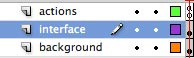
Add two layers
- Interface
- Actions
Your movie should look like this:
Now lets make a border by dragging the rectangle tool onto the stage given the app a white area with a grey boarder.

Now drag an instance of the Text Are onto the stage
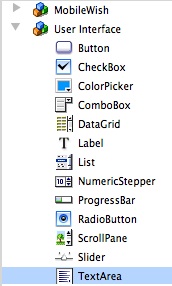
In the properties panel, pick an instance name “runtimeOutput1” there will be 3 of them.
Put the text area in the top left corner, with the following dimensions:
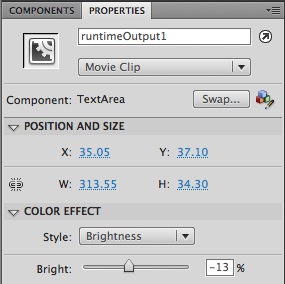
The “brightness of -13% is what makes it grey, now repeat this 2 more times to have a total of three text areas on the stage in a row. Use the same height and width of (34.30 X 37.10). Give the second one and instance name of runtimeOutput2, and the third one an instance name of runtimeOutput3.
Now drag a button onto the stage
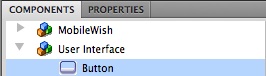
Using the component inspector change the label to “Generate Number Again”
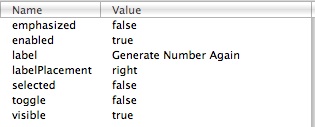
Note- it’s up to you to play with the coloring of the button.
Give the button an instance name of “replayButton”
The final design is now done, and should look like this
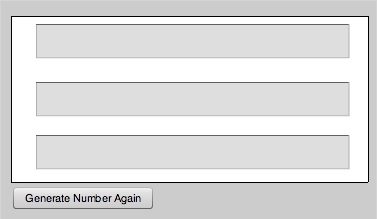
Now open the actions panel, and let’s start coding -
First we will put a stop actions in the frame, and the import the classes that we will need. The stop actions prevents from continuous looping. This is a good practice to get into, and is required in the case you plan to use actionscript with the components, but in our case they are not need.
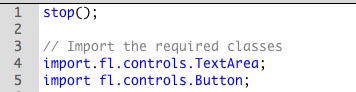
Now we can start coding for the first box.
We need a min limit, a max Limit and a range, and we will use unit.
We set are variables using the var keywork.
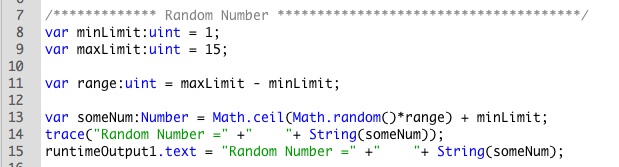
So you see the min value is 1, and the max value is 15. Then we make a variable called someNum, which generates a random number (along with Math.random), and then we trace this to the output window. We can see this in the flash authoring tool, and it is a good habit to get into for debugging your movies. The trace options are commented out in the source code, remove the comments to see the tracing in action.

Finally we output the phrase along with the random number in the text Area by using the instance name.Text along with what we are tying to pass in there.
You should see the same output in your first text area as well as the output panel.
Next we will cover the array.
To learn more about arrays, please refer to the docs:
http://livedocs.adobe.com/flash/9.0/ActionScriptLangRefV3/index.html?Array.html&class-list.html
An array is data structure that stores a collection of individual values that are of the same data type (Strings, Numbers, etc.) Arrays are useful because instead of having to separately store related information in different variables, you can store them—as a collection—in just one variable.
So to you arrays in flash will need to set the array to a new array class.
Then we need to set a variable, and use a loop to go through all the numbers. Finally, we need to get the information out of the array, which is done with the “push”.
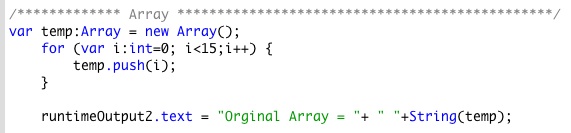
You could trace this too (it is in the source code), but here I am not.
To go over the code we set the var of the array “temp”, and then we use a FOR loop to go through the array. Remember that Array’s are zero-based, and so the first number is always zero and not 1!
Then we use the array name and push the variable, which is done with
temp.push(i);
Finally we output the results to the text area on the stage.
Now we are ready to use this array, and create a random number out of it.
So to take the temp Array, and turn it into a random array (based on the same characteristics) we create a new array called “myArray”.
The we check if there are elements in the array by using the .length() > 0. If this is true, we create a new variable called “rand” and set that to a random number, then multiple that to the length of the array. Then we push this data in temp using the rand variable.
Finally, we use splice which adds and removes items from the array. Then we out put this information to the text area.
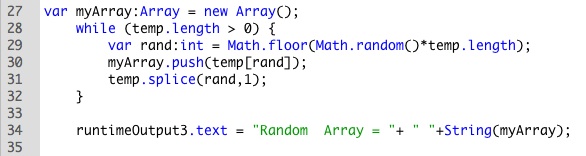
You can run the example now, as it is complete, However, I would like to add one more element, that is a play again button, which is why we put everything on frame 2 for this example.
For the button which you named replayButton you will add an addEventListener, which will be of type Mouse Event, and then to create a function buttonClick.
Also, for something new, lets create a hand over cursor by using the useHandCursor=true. Finally in the buttonClick class, we don’t return anything which is why it is void, and all we want to do is to go back to frame 1, which we do by gotoAndPlay(1);

Now our final application
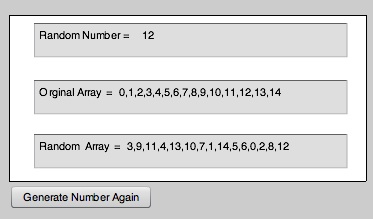

You can download the Source Code here
Have fun, and if you have any question, please email Johnny
Happy Flashing-




hi, it gives me feedback access of undefined property: rand”
what’s wrong?
that means flash is not able to find your variable. Check for typos. if you used the exact code, everything is working. You can download the example as well to compare with what you did.
The link for the source files gives the wrong file.
Could this please be updated?
Cheers…
[…] either a wide array of colourings will be in order or simply a few of your favored colors. …Random Numbers With AS 3 in Flash CS 4 | Flash, Design …In this tutorial we will explore random numbers in flash CS 4, along with using the Text Area […]
[…] Random Numbers With AS 3 in Flash CS 4 […]
Thank you for a good article and useful tips, guys!
Are people still getting the wrong link for the source files?